Employee Leave Tracking
Ditch the manual leave forms. Automate time-off requests.
Allow your team to submit leave requests from anywhere. Members track their own leaves, while Admins get a centralized dashboard for one-click approvals and immediate sync with project & team workloads.
Apply for Leave
My Leave Requests
flight_takeoff Annual Leave (2 Days)
24 Sep 2026 - 26 Sep 2026medical_services Sick Leave (1 Day)
12 Sep 2026money_off Unpaid Leave (1 Day)
5 Sep 2026Simplify time-off for everyone.
Instant Submissions
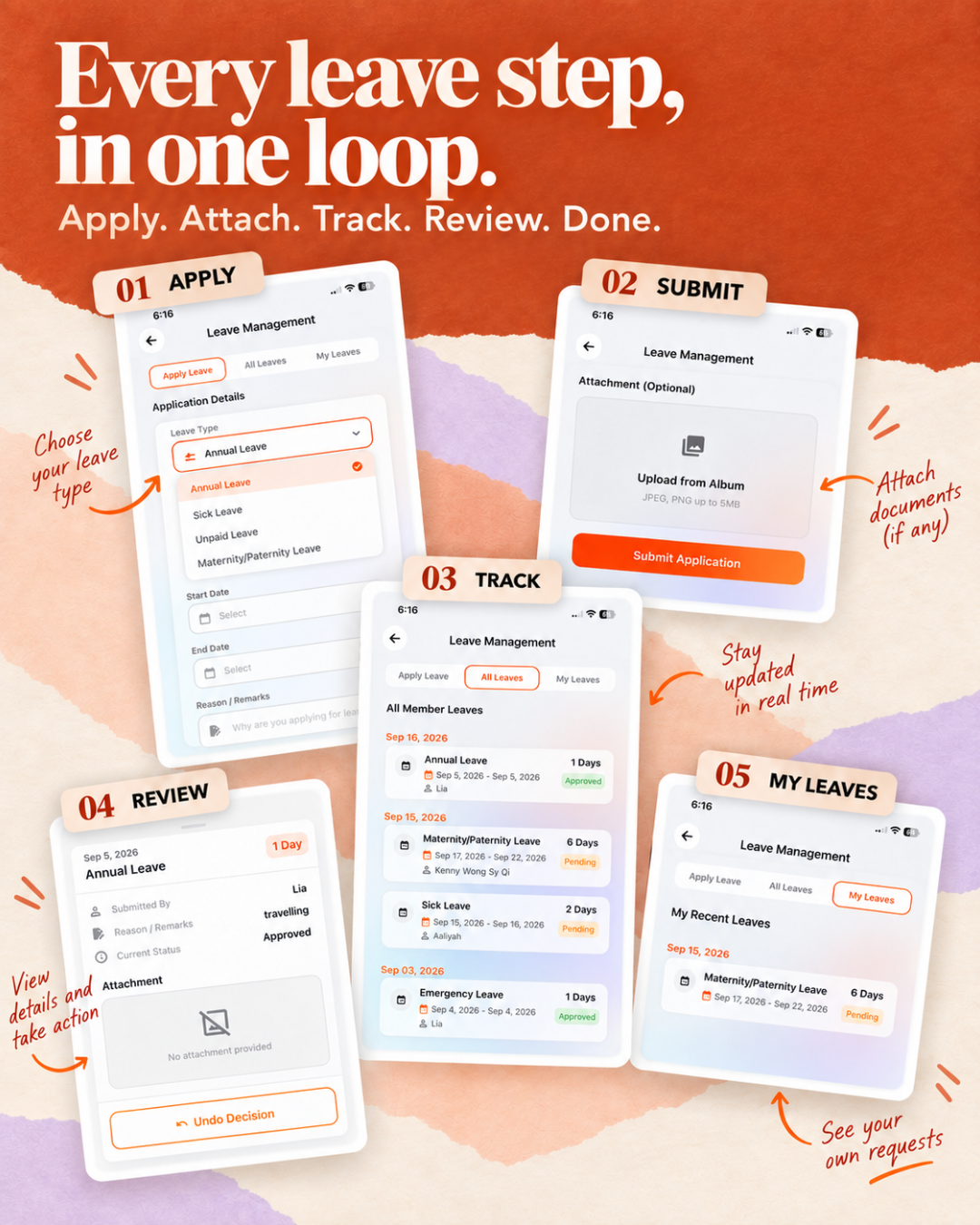
Employees select their leave type, pick the start and end dates, provide a reason, and optionally attach a medical certificate (MC) straight from their device.
Secure Admin Approvals
Only designated Admins with explicit permissions can view the global company leave list. They can quickly approve or reject requests instantly.
Member Autonomy
Members have full visibility over their own leave history. If a submitted request is still marked as pending, they can easily delete it to correct dates or cancel the request.
Stop Losing Track of Employee Absences
Relying on paper forms, WhatsApp messages, or scattered emails for leave requests creates a disorganized HR environment. When staff are absent without proper tracking, project timelines suffer and workload distribution becomes a guessing game. LiaLoop centralizes all leave data into one seamless dashboard.
Syncs Automatically with Project Workload
The biggest advantage of managing leave within LiaLoop is its deep integration with project management. When an Admin approves a leave request, that employee's availability is instantly blocked out on the Team Workload dashboard. Site supervisors and project managers are immediately prevented from assigning them tasks during their time off, preventing scheduling conflicts.
Managing Medical Certificates (MC) Securely
For sick leaves, tracking physical medical certificates is tedious. Our system allows employees to snap a photo or upload a PDF of their medical certificate directly inside the submission form. Admins can view this attachment during the approval process, ensuring compliance while keeping digital records intact.
Frequently Asked Questions
How do employees submit a leave request?
Users can simply submit the leave form by selecting the leave type, entering their start and end dates, providing a short reason, and optionally uploading an attachment like a medical certificate.
Who has permission to approve leaves?
Only designated Admins with the correct HR permissions can view the global leave list. They have the exclusive authority to approve or reject submissions.
Can an employee delete a leave request they made by mistake?
Yes. All members can view their own leave history on their dashboard. If a leave request's status is still pending, the user can remove or delete it. Once it has been approved or rejected, the record is locked.
Ready to automate your HR?
Empower your team to manage their time-off while keeping projects on track.